Augmented reality gaming bridges the gap between digital entertainment and the physical world by overlaying interactive graphics, characters, and challenges directly onto a player's real-time environment. By using a device's camera, sensors, and geolocation data, this medium transforms everyday spaces like living rooms and city streets into dynamic playgrounds.
Understanding Augmented Reality Gaming
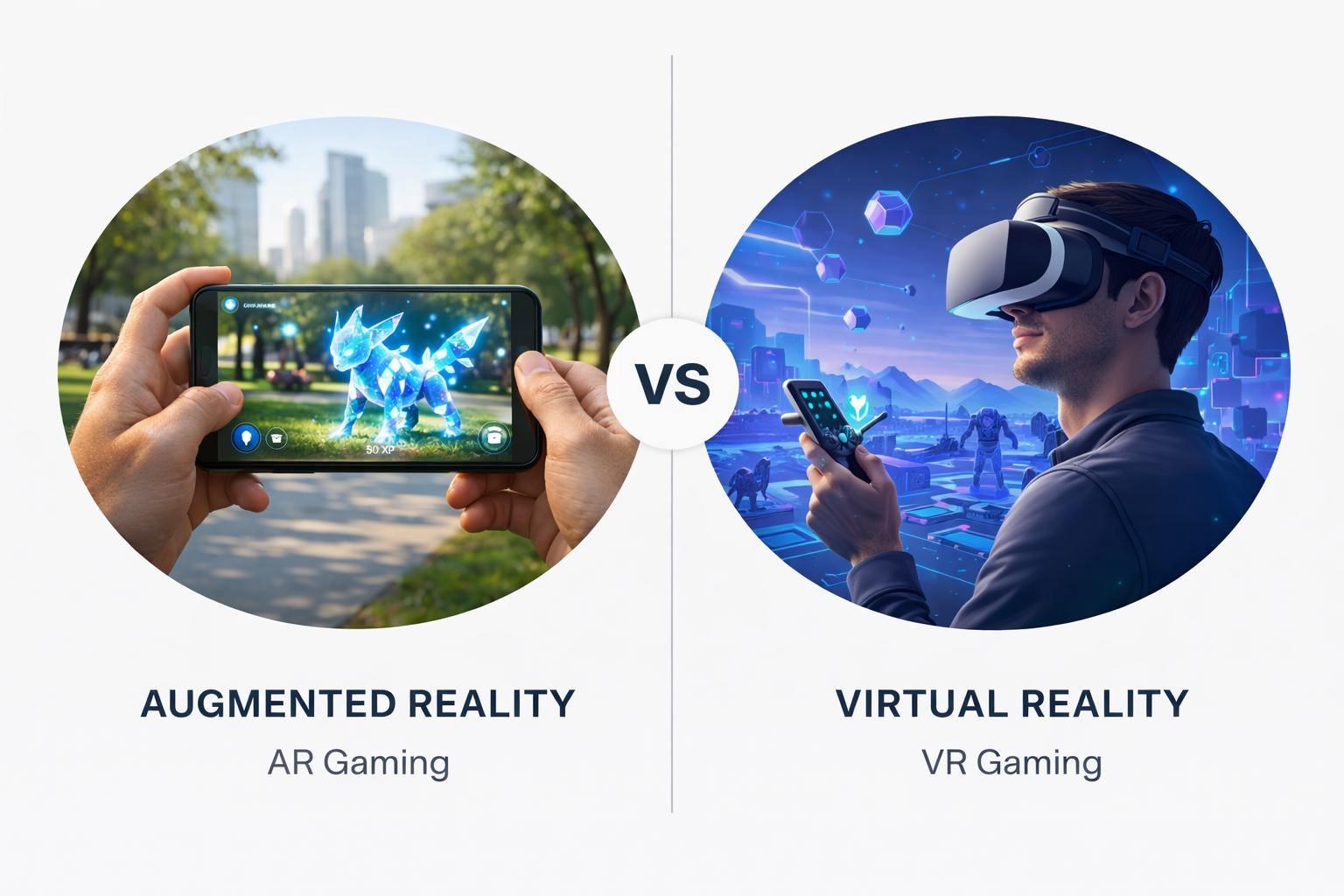
Augmented reality (AR) gaming represents a major evolution in how interactive entertainment is consumed. Unlike virtual reality (VR), which completely isolates the player inside a fully computer-generated environment, AR enhances the real world. It anchors digital assets to physical surfaces, creating the illusion that virtual objects coexist with physical furniture, buildings, and landscapes.
The core mechanism relies on simultaneous localization and mapping (SLAM), computer vision, and inertial measurement units (IMUs). Together, these technologies allow mobile phones, tablets, and dedicated headsets to scan a room, recognize flat planes, and track movement with high precision. When a virtual character walks across a living room rug or hides behind a kitchen chair, the device calculates depth and scale to keep the illusion convincing.
The Evolution from Niche Novelty to Mainstream Medium
Early iterations of AR entertainment were simple overlay novelties, often restricted to print markers that unlocked basic 3D models when viewed through a smartphone camera. The paradigm shifted dramatically with the commercial proliferation of advanced smartphones equipped with high-resolution sensors and dedicated software development kits like Apple's ARKit and Google's ARCore.
The release of Pokémon GO in 2016 demonstrated the massive commercial viability of location-based augmented reality. By marrying global positioning system (GPS) mapping with real-world landmarks, the title transformed urban exploration into a global phenomenon. Since then, the ecosystem has expanded beyond casual mobile experiences to encompass indoor spatial games, mixed reality headset titles, and immersive tabletop experiences.
Hardware and Technical Requirements
Playing modern AR games requires specific hardware capabilities. While mobile devices remain the most accessible entry point, dedicated spatial computing hardware offers deeper immersion and advanced tracking features.
Mobile Devices and Tablets
Smartphones and tablets represent the largest segment of the AR gaming market. Modern iOS and Android devices utilize sophisticated multicore processors and neural engines to handle real-time environmental mesh generation and lighting estimation.
- Processing Power: A capable CPU and GPU are required to render 3D graphics while simultaneously processing camera feeds and sensor data.
- Camera and Sensors: High-frame-rate cameras, gyroscopes, and accelerometers track device orientation and movement. Some advanced phones include LiDAR (Light Detection and Ranging) scanners, which measure depth instantly to place virtual objects with pinpoint accuracy.
- Battery Consumption: Continuous camera usage, GPS tracking, and heavy graphics rendering place a significant strain on battery life, requiring players to manage power settings during extended sessions.
Dedicated AR Headsets and Smart Glasses
As hardware matures, dedicated headsets and smart glasses are shifting AR gaming from flat touchscreens to hands-free, stereoscopic environments. Devices such as the Apple Vision Pro, Microsoft HoloLens, and various lightweight consumer smart glasses project digital elements directly into the user's natural field of view.
These devices utilize advanced wave-guide optics, eye tracking, and gesture recognition. Instead of tapping a glass screen, players use hand gestures or physical controllers to interact with holographic interfaces. However, widespread adoption of dedicated headsets remains constrained by high retail costs, battery limitations, and bulky form factors.
Comparison of AR Gaming Platforms
Different hardware tiers offer distinct gameplay experiences, accessibility levels, and technical capabilities.
| Platform Type | Primary Devices | Cost Barrier | Immersion Level | Portability |
|---|---|---|---|---|
| Mobile AR | Smartphones, Tablets | Low (Existing Device) | Moderate | High (Pocket-sized) |
| Location-Based AR | Smartphones with GPS | Low (Existing Device) | Moderate | High (Outdoor focus) |
| Spatial Headsets | Mixed Reality / AR Glasses | Very High | Very High | Low to Moderate |
| Console-Linked AR | External Cameras (e.g., historical setups) | Moderate | Low to Moderate | None (Stationary) |
Major Genres and Gameplay Mechanics
The integration of physical space into software design has given rise to distinct genres that leverage the strengths of augmented reality.
Location-Based Exploration
Location-based games tie progression and interaction to real-world geography. Players travel through neighborhoods, parks, and city centers to find resources, battle adversaries, or capture virtual creatures.
- Spatial Exploration: Encourages physical movement and outdoor activity by rewarding players for exploring new geographic areas.
- Community Events: Frequently incorporates real-world meetups, cooperative raids, and seasonal festivals that foster local player communities.
Tabletop and Room-Scale Strategy
Room-scale and tabletop AR games turn any flat surface—such as a coffee table, floor, or desk—into a digital game board.
- Dynamic Viewpoints: Players can physically walk around a rendered castle siege or a holographic sci-fi battleground, viewing the action from any angle by changing their physical position.
- Environmental Interaction: Advanced titles allow virtual characters to interact with real obstacles, utilizing physical walls for cover or furniture for elevation advantages.
Interactive Fitness and Exergaming
By combining gamification with physical exertion, AR fitness titles turn workouts into engaging challenges. Players might dodge incoming virtual projectiles in their living rooms, squat to power up a digital shield, or run through real-world paths while defending a virtual kingdom.
Practical Considerations and Player Challenges
While AR gaming offers innovative experiences, players and developers must navigate several practical challenges.
Environmental Constraints and Safety
Because AR integrates digital elements into physical spaces, real-world hazards are a primary concern.
- Spatial Awareness: Players focused on a phone screen or headset display may fail to notice physical obstacles, uneven terrain, or moving traffic.
- Lighting and Surface Texture: Poor indoor lighting or reflective glass surfaces can disrupt computer vision algorithms, causing virtual objects to drift, stutter, or disappear entirely.
Privacy and Data Security
Location-based and camera-reliant games collect vast amounts of environmental and spatial data. Developers must map physical rooms or track precise GPS coordinates, raising valid questions regarding user privacy, data storage, and third-party access to personal spaces.
Frequently Asked Questions
Do I need special equipment to play AR games?
Most augmented reality games require only a modern smartphone or tablet equipped with a working camera, gyroscope, and internet connection. High-end spatial headsets are optional for advanced experiences.
Does AR gaming drain smartphone battery life quickly?
Yes. Because AR applications simultaneously utilize the camera, GPS, motion sensors, and graphical processing units, they consume significantly more battery power than standard mobile applications.
Can AR games be played indoors?
Many modern AR titles are designed specifically for indoor play, using surface-detection technology to anchor digital content to floors, tables, and walls without requiring GPS signals.
Are location-based AR games safe for children?
While location-based games encourage outdoor physical activity, young players should be supervised to ensure they remain aware of traffic, private property boundaries, and stranger safety during outdoor exploration.
How does AR differ from VR in gaming?
Augmented reality overlays digital elements onto the real physical world, allowing players to see their actual surroundings. Virtual reality completely replaces the physical environment with a fully enclosed, computer-generated simulation.
Next Actions for Players
To begin exploring augmented reality gaming, check the compatibility of your current mobile device by visiting official application stores and verifying support for AR development frameworks. Start with well-optimized, free-to-play mobile titles to test how your hardware handles spatial tracking and battery consumption before investing in dedicated accessories or hardware upgrades.
)