(Note: "VZW payment" refers exclusively to billing, account management, and financial transactions associated with Verizon Wireless services.)
Navigating your monthly wireless expenses requires a clear understanding of modern billing structures, payment channels, and account security protocols. As mobile infrastructure evolves, managing wireless financial obligations has shifted toward automated ecosystems, digital wallet integrations, and strict data security compliance. Whether you are settling a standard monthly statement, managing corporate lines, or handling sudden financial hardship, understanding how Verizon Wireless (VZW) processes transactions ensures uninterrupted connectivity across your devices.
Understanding Your Verizon Wireless Billing Cycle and Charges
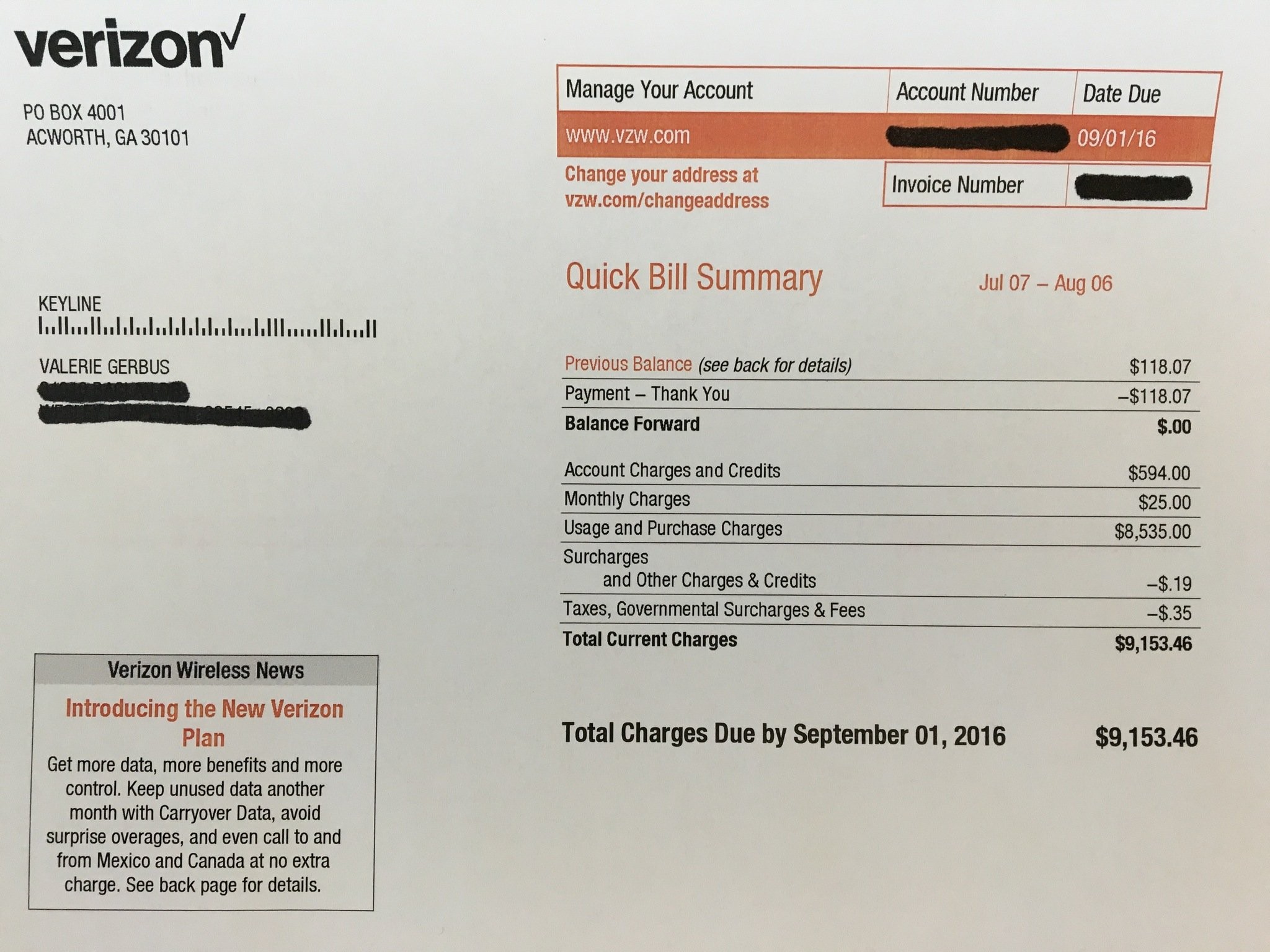
Managing your VZW payment effectively begins with decoding the structure of your monthly statement. Verizon operates on a recurring billing cycle that typically generates on the same date each month, though the exact bill-due date varies based on your account activation history.
When reviewing your itemized statement, several core components dictate the final total:
- Line Access Fees: The baseline monthly charge for each smartphone, tablet, or connected device active on your account plan.
- Device Payment Agreements (DPAs): The remaining installment balance for hardware financed over a 24- or 36-month zero-interest window.
- Usage Charges: International roaming, pay-per-use text messaging, or domestic long-distance charges outside of your plan parameters.
- Taxes, Surcharges, and Governmental Fees: Federally mandated Universal Service Fund (USF) fees, state and local sales taxes, and 911 service surcharges.
- Promotional Credits: Applied bill credits (such as trade-in valuations distributed over 36 months) which offset hardware financing costs.
Billing Cycle Accuracy Tip Always verify your billing statement immediately after a plan change or hardware upgrade. Pro-rated charges often appear during the first billing cycle following a mid-cycle modification, resulting in a temporarily higher balance than your standard monthly rate.
Authorized VZW Payment Methods and Channels
Verizon provides numerous secure avenues to settle your account balance. Choosing the correct payment method depends on whether you prefer automated convenience, manual digital control, or traditional in-person assistance.
1. Digital and Online Portals
The My Verizon website and the My Verizon mobile application serve as the primary hubs for account settlement. These platforms utilize advanced encryption protocols to safeguard banking information and credit card data. Users can log in via biometric authentication (Face ID or fingerprint recognition) to execute instant one-time payments using major credit cards, debit cards, or direct Automated Clearing House (ACH) bank transfers.
2. Automated Payment (Autopay) and Paperless Billing
Enrolling in Autopay combined with paperless billing is heavily incentivized by the carrier. This mechanism automatically charges a designated debit card, checking account, or Verizon Visa Card on your bill due date.
3. Alternative Payment Channels
For users requiring offline or non-standard transaction methods, alternative options remain fully supported:
- Text-to-Pay: Send a quick text command to initiate a pre-saved payment method securely.
- Interactive Voice Response (IVR): Call the customer service line (typically dialing #PMT from your mobile device) to complete an automated payment via phone.
- Retail Store Kiosks: Visit a corporate Verizon store to utilize self-service payment kiosks accepting cash, debit, or credit.
- Physical Mail: Send a traditional paper check along with your bill remittance slip to the designated processing address.
Comprehensive Comparison of VZW Payment Options
To optimize how you handle your wireless expenses, evaluate the features, processing speeds, and security measures associated with each transactional pathway.
| Payment Method | Processing Speed | Convenience Level | Associated Discounts | Best Suited For |
|---|---|---|---|---|
| My Verizon App | Instant | High | Standard | Users who manage accounts on-the-go |
| Autopay & Paperless | Automated on Due Date | Maximum | Maximum Monthly Discount | Set-it-and-forget-it budgeters |
| Retail Kiosk / Cash | Instant | Low (Requires travel) | None | Cash-only or unbanked consumers |
| Phone IVR (#PMT) | Instant | Moderate | None | Users without smartphone data access |
| Mail-In Check | 7-10 Business Days | Very Low | None | Traditionalists avoiding digital banking |
Step-by-Step Guide to Setting Up Autopay and Securing Discounts
Maximizing your financial efficiency with Verizon involves configuring automated disbursements correctly to capture available promotional discounts. Follow this systematic workflow to establish Autopay securely:
- Access the Secure Portal: Open the My Verizon app on your smartphone or navigate to the official desktop login page using multi-factor authentication (MFA).
- Navigate to Billing: Select the "Billing" tab from the primary navigation dashboard and choose "Autopay."
- Select Your Funding Source: Input your preferred checking account routing details or eligible debit card. Note that Verizon frequently restricts maximum monthly discount eligibility to debit cards, checking accounts, or the Verizon Visa Card, excluding standard credit cards from specific promotional discounts.
- Configure Execution Date: Confirm that the automatic withdrawal aligns safely with your income deposits to prevent accidental overdrafts.
- Opt Into Paperless Billing: Check the box agreeing to electronic statements to trigger the simultaneous activation of your account discount.
- Save and Verify: Complete the security verification prompt and review the confirmation screen verifying that the discount has been successfully tagged to your billing profile.
Pros and Cons of Automated Wireless Payments
Transitioning to automated financial management for utility and telecom services offers distinct operational advantages, alongside a few considerations regarding cash flow control.
Advantages
- Guaranteed On-Time Payments: Eliminates the risk of accidental service suspensions, late fees, or negative impacts on credit reporting.
- Significant Cost Savings: Captures recurring monthly plan discounts reserved exclusively for Autopay participants.
- Time Efficiency: Removes the friction of manually logging into portals every month to authorize transfers.
Disadvantages
- Cash Flow Visibility: Automatic withdrawals can occasionally surprise account holders if unexpected usage charges or pro-rated equipment fees inflate the statement total.
- Dispute Complexity: While refunds for erroneous charges can be processed, reversing an automated bank draft requires coordinating directly with carrier support or initiating formal banking disputes.
Expert Strategies for Managing Billing Discrepancies and Financial Hardship
Even with meticulous planning, billing errors occur or temporary financial hurdles arise. Implementing proactive remediation strategies ensures your mobile service remains uninterrupted.
- Audit Line-Level Details Monthly: Do not just look at the bottom-line total. Expand your PDF bill to verify that promotional device credits successfully posted against your active installment contracts.
- Leverage Deferred Payment Arrangements: If you experience temporary financial distress, log into the My Verizon app before your bill due date to explore structured payment arrangements. Verizon often permits eligible accounts to split payments or push due dates back by a limited number of days without triggering immediate line suspensions.
- Monitor Third-Party Purchases: Protect your account against unauthorized charges by blocking premium SMS services and third-party billing additions directly through your online security settings.
Frequently Asked Questions About VZW Payments
How can I make an instant payment without logging into my account?
You can use the secure "Pay Bill" guest feature on the official website by providing your mobile number and account PIN, or dial #PMT from your Verizon device to pay via automated phone prompts.
- Deeper Context: Guest payment portals utilize tokenized security to process your transaction without exposing full account profiles, making them ideal when handling payments on behalf of family members.
Why did my monthly VZW payment increase unexpectedly?
A sudden spike usually stems from the expiration of a promotional discount, the addition of one-time international travel passes, or taxes adjusting on equipment financing.
- Deeper Context: Review your previous month's statement side-by-side with the current bill using the PDF comparison tool in your online portal to pinpoint exact line-item variance.
Does paying with a credit card affect my Autopay discount?
Yes, utilizing certain major credit cards for Autopay may disqualify your account from maximum monthly discounts compared to using a debit card, bank account, or the Verizon Visa Card.
- Deeper Context: Review the fine print on your specific rate plan tier, as carrier policies heavily incentivize direct bank-to-institution transfers to lower merchant processing fees.
What happens if my VZW payment fails or bounces?
A failed ACH transfer or declined card will trigger a notification alerting you to update your payment method, and a returned payment fee may be assessed to your account.
- Deeper Context: If funding issues persist, Verizon will issue a strict grace period before placing temporary outgoing call and data restrictions on your active lines until the balance is cleared.
Can I change my monthly bill due date?
Yes, primary account holders can request a bill cycle adjustment through customer support or online chat.
- Deeper Context: Changing your cycle date will result in a transitional bill containing a partial pro-rated charge to bridge the gap between your old cycle and your new preferred date.
How do device trade-in credits apply to my monthly payment?
Trade-in values are rarely paid out in a lump sum; instead, they are distributed as monthly bill credits over a 24- to 36-month installment window.
- Deeper Context: If you choose to pay off your device early, the remaining device balance becomes due immediately, and the remaining promotional bill credits are automatically accelerated onto your final statement balance.
Secure Your Wireless Continuity Today
Maintaining control over your wireless finances prevents service interruptions and ensures you capture every available account discount. Log into your secure My Verizon portal today to verify your Autopay settings, review active installment agreements, and optimize your monthly billing profile for maximum efficiency.